Partner Integration API (1.9.0)
API specification for freight forwarding system (FFS) partners integrating with BravoTran.
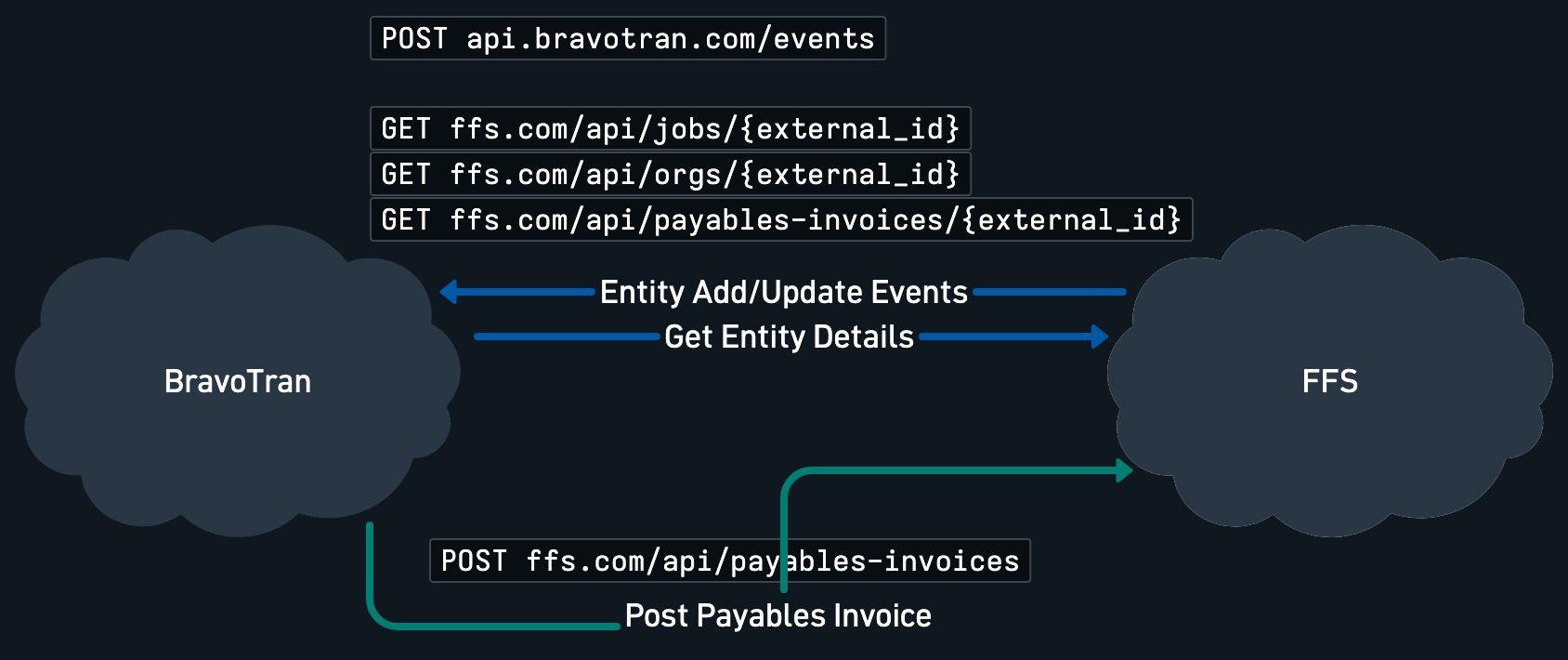
BravoTran uses an event-driven pull model to stay in sync with your freight forwarding system:
- Your system sends an event notification to BravoTran when an entity is created or updated.
- BravoTran reads the entity type and identifier from the event.
- BravoTran issues a
GETrequest to your API with the entity type and identifier. - Your API returns the entity as JSON per this specification.
BravoTran also POSTs approved invoices to your system for cost posting. When an invoice is approved in BravoTran, it sends a POST /payables-invoices request to your API with the invoice details. Your system must create or record the invoice accordingly.
If your system cannot reliably push live event notifications, you may instead implement the optional list endpoints GET /orgs, GET /jobs, and GET /payables-invoices. BravoTran will periodically poll them with an updated_after window, get back the identifiers of anything that changed, then call the existing single-entity detail endpoints to fetch each one. Implement either the events API or the list endpoints — not both. All three list endpoints must be implemented together; BravoTran's polling assumes complete coverage of all entity types.
Creates and updates are surfaced through the same filter: when an entity is created, set updated_at to the creation timestamp and it will appear in any subsequent polling response whose updated_after is at or before that timestamp. There is no separate "creation" feed.
| Term | Definition |
|---|---|
| FFS | Freight Forwarding System — your system |
| Company | A country-level entity in the FFS; maps to a BravoTran Account |
| Account | BravoTran's representation of a company/country |
| Org | A vendor, carrier, creditor, or debtor |
| Creditor | An org that issues payables invoices; referenced as creditor on invoices and accruals |
| Job | A consol (consolidation/master) or shipment (house) |
| Accrual | An expected charge on a job |
| Charge Line | A line item on a payables invoice |
| Payables Invoice | AP invoice from a creditor |
| Outbound Payables Invoice | Approved invoice posted from BravoTran to the partner's system for cost posting |
BravoTran maps a Company in the FFS to an Account in BravoTran. Often a company represents a country. It is acceptable to have more than one account for a country if that country has multiple companies, but a single account must never represent multiple companies or countries.
external_id— Unique, immutable identifier for every entity. Used as the foreign key between systems. Typically the primary key in your database. Not visible to end users. The exampleexternal_idvalues throughout these docs are GUIDs, but they don't have to be — anexternal_idis whatever the stable identifier for the entity is in the FFS.updated_at— ISO 8601 timestamp of when the entity was last modified. BravoTran uses this as a version marker to prevent overwriting with stale data. For jobs, this must update when any child data changes (e.g., accrual added/edited, shipment added to consol). On creation,updated_atmust be set to (at least) the creation timestamp so newly created entities appear in polling responses alongside updates — the polling endpoints make no distinction between creates and updates. Charge codes and tax codes are complete lists rather than versioned entities, soupdated_atis optional on them.- Amounts — Wherever there is an amount, a corresponding
currency(ISO 4217) must be provided. - Local vs. overseas amounts —
local_amountis in the account's local currency (the currency of the country the forwarder operates in).overseas_amountis in the vendor's currency — whatever currency the charge or invoice is denominated in. The two may be the same (e.g., a domestic vendor). - Country codes — Country fields use ISO 3166-1 alpha-2 two-letter codes.
- Nested references — Related entities are represented as nested objects containing at minimum an
external_id. - Error codes — Error responses use
lower_snakecodes in both directions. BravoTran keys off the HTTP status rather than partner error bodies.
Staff data is provided via flat file — typically a spreadsheet export from the FFS. Any format your FFS can export works; field names don't matter as long as the required contents are present. If you don't have an existing export, use the recommended format, which lists each field and whether it is required. Alternatively, implement GET /staff and BravoTran will fetch staff data from your API instead.
Charge code data is provided via flat file — typically a spreadsheet export from the FFS. Any format your FFS can export works; field names don't matter as long as the required contents are present. If you don't have an existing export, use the recommended format, which lists each field and whether it is required. Alternatively, implement GET /charge-codes and BravoTran will fetch charge code data from your API instead. Accruals and charge lines reference charge codes by external_id; the mapping is maintained through the charge code data.
For a GST/VAT account, API delivery of charge codes also requires GET /tax-codes.
Tax code data is provided via flat file — typically a spreadsheet export from the FFS. Any format your FFS can export works; field names don't matter as long as the required contents are present. If you don't have an existing export, use the recommended format, which lists each field and whether it is required. Alternatively, implement GET /tax-codes together with GET /charge-codes and BravoTran will fetch both lists from your API.
Each direction of communication uses one authentication method, agreed during onboarding.
POST /events accepts any of the following. BravoTran issues the credentials during onboarding.
BravoTran issues an API token for each account. Send it in the Authorization header:
Authorization: Token token=<token>or in an x-api-key header:
x-api-key: <token>Exchange your OAuth client credentials for an access token with POST /oauth/token, then send the access token with each event:
Authorization: Bearer <access_token>Access tokens expire after expires_in seconds (3600 unless agreed otherwise). There are no refresh tokens: request a new access token when the current one expires. POST /events returns 401 for an expired or invalid access token.
Your OAuth client authenticates to the token endpoint in one of two ways, chosen when BravoTran sets it up.
Client ID and client secret. BravoTran issues a client ID and a client secret. The secret is shown only once, so store it securely. Send the credentials with HTTP Basic authentication or as client_id and client_secret form fields, but not both. For HTTP Basic, form-URL-encode the client ID and the secret before joining them with : and base64-encoding the result (RFC 6749 §2.3.1). Credentials sent in the query string are rejected. When BravoTran replaces a secret, the old secret stops working immediately; access tokens already issued with it stay valid until they expire.
curl -X POST https://api.bravotran.com/oauth/token \
  -u "<client_id>:<client_secret>" \
  -d grant_type=client_credentials
Certificate. Your client authenticates with a JWT signed by your private key (RFC 7523):
- Generate an RSA key pair and a certificate signing request (CSR), and send the CSR to BravoTran. Keep the private key in your system; BravoTran never needs it.
- BravoTran returns a signed certificate, valid for one year, and your client ID. Send a new CSR before the certificate expires.
- For each token request, create a JWT signed with your private key:
| Part | Field | Value |
|---|---|---|
| Header | alg | RS256 |
| Header | x5t#S256 | Optional. Base64url-encoded SHA-256 thumbprint of your certificate (DER), without padding. |
| Claim | iss | Your client ID |
| Claim | sub | Your client ID |
| Claim | aud | https://api.bravotran.com/oauth/token, exactly |
| Claim | iat | Time the JWT was issued, in seconds since the Unix epoch |
| Claim | exp | Expiry time, in seconds since the Unix epoch. No more than 7 days after iat. |
| Claim | nbf | Optional. Time before which the JWT is not valid |
| Claim | jti | Optional. A unique ID for the JWT; if sent, each value can be used only once |
Send the JWT as client_assertion, with client_assertion_type set to urn:ietf:params:oauth:client-assertion-type:jwt-bearer.
BravoTran authenticates to your endpoints with one of the following:
- OAuth 2.0 client credentials — BravoTran requests a token from your token URL with
grant_type=client_credentialsand yourclient_idandclient_secretas form fields, expects a JSON response with anaccess_token, and sends it asAuthorization: Bearer <access_token>. - Bearer token — a static token in the
Authorizationheader, sent asAuthorization: Bearer <token>.
Backwards compatible: no partner changes required. Every change below loosens a rule, so charge code and tax code data that is valid under 1.8.0 stays valid.
- Charge codes and tax codes:
descriptionis optional and may benull. BravoTran shows thecodewhere a description is missing. - Charge codes and tax codes:
updated_atis optional. Both lists are complete snapshots, so BravoTran doesn't use it to order them. It stays required on orgs, jobs, payables invoices, and staff. - Charge codes:
tax_codeis the default tax code for charge lines that have no accrual tax code, and may benullon every account, including GST/VAT accounts. The key is still always included. When present it must match anexternal_idin the tax codes data.GET /tax-codesis still required for GST/VAT accounts that useGET /charge-codes.
Rules that were previously stated only in field descriptions are now part of the schema, so a validator can check them. BravoTran's import behavior is unchanged in this release. A later release will validate the responses BravoTran fetches against this schema and reject payloads that fail; the changelog will say so when that happens.
- Accruals:
cost_invoice_numberandcost_invoice_dateare required and non-null whencost_postedistrue. - Identifiers can no longer be empty strings:
external_idon every entity and reference,job_number,invoice_number, orgnameandcode, charge code and tax codecode, and waybillnumber. - Jobs:
parent_jobsholds at most one entry, matching the documented behavior. - Orgs:
days_to_paymust be zero or greater, and between 1 and 31 whenpayments_scheduling_ruleisday_n_month_after_invoice_date. Anullvalue means BravoTran uses the account's default. POST /payables-invoices:due_dateisnullwhenis_credit_noteistrue. It is alsonullwhen BravoTran is not configured to send due dates for the account; earlier wording implied a date was always sent for invoices.- Amounts: documented that
totalequalspre_taxplustax.
Rules that depend on other data stay as descriptions and are not checked by the schema: references must match an external_id in the related data, invoice numbers are unique per creditor, and tax codes are required only for GST/VAT accounts.
- Documented the authentication options for
POST /events: an API token, or an OAuth 2.0 access token obtained with a client ID and client secret or with a certificate. - OAuth clients can now authenticate to the token endpoint with a client ID and client secret, using HTTP Basic authentication or form fields. Certificate (signed JWT) authentication is unchanged.
- Added
POST /oauth/token, BravoTran's token endpoint, with its request fields, response, and errors. - Documented that BravoTran sends
client_idandclient_secretas form fields when requesting a token from your token URL.
The following entries correct earlier documentation; BravoTran's behavior is unchanged:
- Corrected the tax notes for
GET /jobs/{external_id}andGET /payables-invoices/{external_id}to match the schemas: always include numerictaxvalues, using0.0for non-tax accounts. Job accruals must also includetax_code, usingnullfor non-tax accounts. Earlier wording incorrectly allowed these fields to be omitted. - Corrected the
POST /payables-invoicestax note and schemas:taxis always present and numeric; charge-linetax_codeandtax_rateare always present and arenullfor accounts without GST/VAT. - Corrected the
POST /payables-invoicescredit-note description: credit-note totals are positive, but individual lines retain their sign relative to the document, so discount lines can be negative. - Clarified that GST/VAT accounts using
GET /charge-codesalso requireGET /tax-codes, and that tax-code data is fetched together with charge-code data. - Aligned the job and invoice examples across submission and posting, and corrected the event URL in the flow diagram to
/events.
- BravoTran now rejects an org returned by
GET /orgs/{external_id}whencountryis missing or isn't a valid ISO 3166-1 alpha-2 code, and the import of that org fails.countrywas already required with a two-letter uppercase format; values such asusorUSAare not corrected. - Added the optional
address_line_2field to orgs. - Documented how BravoTran uses the org
address_line_1,address_line_2,city,state, andpostal_codefields, and that sendingnullfor one of them leaves BravoTran's existing value unchanged.
- Charge codes returned by
GET /charge-codesnow include a requiredcharge_typefield classifying the charge asfreight,origin,destination, orother.
- Renamed the
orgreference tocreditoron job accruals (GET /jobs/{external_id}), payables invoices (GET /payables-invoices/{external_id}), and outbound payables invoices (POST /payables-invoices). The referenced entity is still an org fetched via the/orgsendpoints; the key now reflects the role the org plays on these records.
- Payables invoice responses now include a
statusfield (draftorposted) — in bothGET /payables-invoices/{external_id}and thePOST /payables-invoicesresponse body. POST /payables-invoicescharge lines now always include anaccrualreference whoseexternal_idmatches an accrual returned byGET /jobs/{external_id}(nullwhen the charge line has no matching accrual).- Job accruals now include a
tax_codereference. Like other tax fields, it is optional for non-tax / US-based accounts. - Added supporting data endpoints —
GET /staff,GET /charge-codes, andGET /tax-codes— as an alternative to flat file delivery of staff, charge code, and tax code data. POST /payables-invoicesnow documents a409response with error codeduplicate_invoice, returned when an invoice with the sameinvoice_numberalready exists for the org.
POST /payables-invoicesrequests no longer include anexternal_id. Your system generates its own identifier for the created invoice and returns it asexternal_idin the 200 response. BravoTran stores that identifier and uses it forGET /payables-invoices/{external_id}.POST /eventserror responses now uselower_snakeerror codes (validation_error,invalid_json,unauthorized), matching the partner-hosted endpoints.